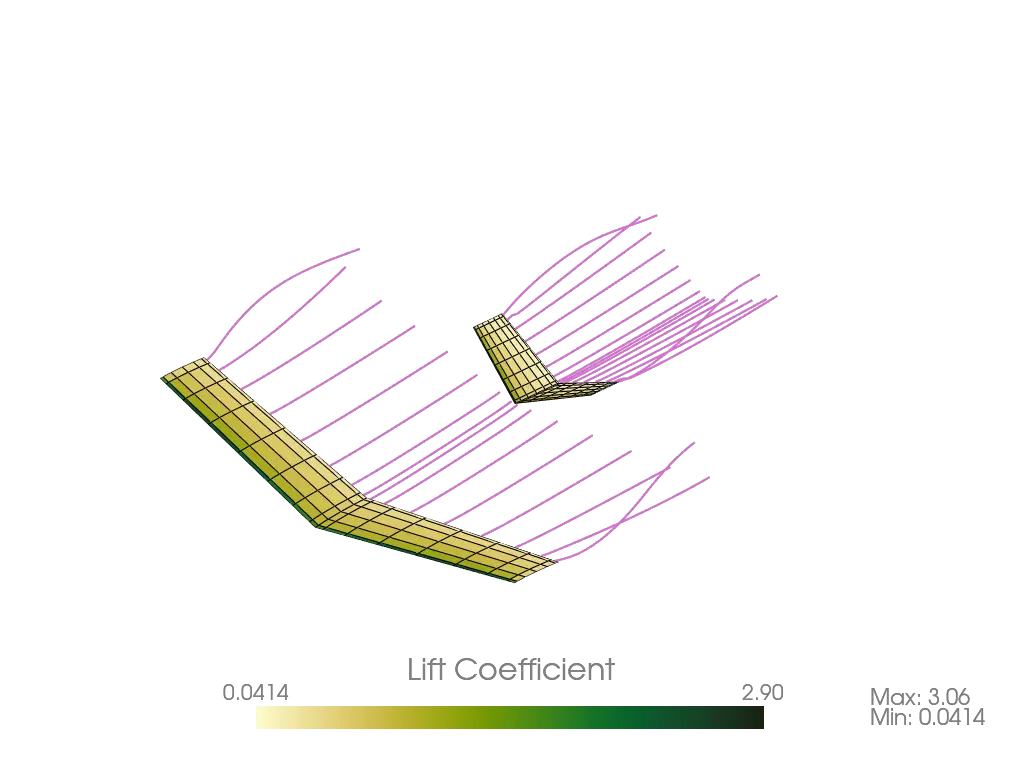
"""Demonstrates running Ptera Software's SteadyHorseshoeVortexLatticeMethodSolver with a
custom airplane.

The script will log simulation results in a log file.
"""

import logging

# First, import the software's main package. Note that if you wished to import this
# software into another package, you would first install it by running "pip install
# pterasoftware" in your terminal.
import pterasoftware as ps

# Configure logging to write info level messages to a file. To display log messages on
# the console alongside progress bars instead, omit the handler argument.
ps.set_up_logging(level="Info", handler=logging.FileHandler("example_solver.log"))

# Create an Airplane with our custom geometry. I am going to declare every parameter for
# Airplane, even though most of them have usable default values. This is for educational
# purposes, but keep in mind that it makes the code much longer than it needs to be. For
# details about each parameter, read the detailed class docstring. The same caveats
# apply to the other classes, methods, and functions I call in this script.
example_airplane = ps.geometry.airplane.Airplane(
    wings=[
        ps.geometry.wing.Wing(
            wing_cross_sections=[
                ps.geometry.wing_cross_section.WingCrossSection(
                    num_spanwise_panels=8,
                    chord=1.75,
                    Lp_Wcsp_Lpp=(0.0, 0.0, 0.0),
                    angles_Wcsp_to_Wcs_ixyz=(0.0, 0.0, 0.0),
                    control_surface_symmetry_type="symmetric",
                    control_surface_hinge_point=0.75,
                    control_surface_deflection=0.0,
                    spanwise_spacing="cosine",
                    airfoil=ps.geometry.airfoil.Airfoil(
                        name="naca2412",
                        outline_A_Lp=None,
                        resample=True,
                        n_points_per_side=400,
                    ),
                ),
                ps.geometry.wing_cross_section.WingCrossSection(
                    num_spanwise_panels=None,
                    chord=1.5,
                    Lp_Wcsp_Lpp=(0.75, 6.0, 1.0),
                    angles_Wcsp_to_Wcs_ixyz=(0.0, 5.0, 0.0),
                    control_surface_symmetry_type="symmetric",
                    control_surface_hinge_point=0.75,
                    control_surface_deflection=0.0,
                    spanwise_spacing=None,
                    airfoil=ps.geometry.airfoil.Airfoil(
                        name="naca2412",
                        outline_A_Lp=None,
                        resample=True,
                        n_points_per_side=400,
                    ),
                ),
            ],
            name="Main Wing",
            Ler_Gs_Cgs=(0.0, 0.0, 0.0),
            angles_Gs_to_Wn_ixyz=(0.0, 0.0, 0.0),
            symmetric=True,
            mirror_only=False,
            symmetryNormal_G=(0.0, 1.0, 0.0),
            symmetryPoint_G_Cg=(0.0, 0.0, 0.0),
            num_chordwise_panels=6,
            chordwise_spacing="cosine",
        ),
        ps.geometry.wing.Wing(
            wing_cross_sections=[
                ps.geometry.wing_cross_section.WingCrossSection(
                    num_spanwise_panels=8,
                    chord=1.5,
                    Lp_Wcsp_Lpp=(0.0, 0.0, 0.0),
                    angles_Wcsp_to_Wcs_ixyz=(0.0, 0.0, 0.0),
                    control_surface_symmetry_type="symmetric",
                    control_surface_hinge_point=0.75,
                    control_surface_deflection=0.0,
                    spanwise_spacing="cosine",
                    airfoil=ps.geometry.airfoil.Airfoil(
                        name="naca0012",
                        outline_A_Lp=None,
                        resample=True,
                        n_points_per_side=400,
                    ),
                ),
                ps.geometry.wing_cross_section.WingCrossSection(
                    num_spanwise_panels=None,
                    chord=1.0,
                    Lp_Wcsp_Lpp=(0.5, 2.0, 1.0),
                    angles_Wcsp_to_Wcs_ixyz=(0.0, 0.0, 0.0),
                    control_surface_symmetry_type="symmetric",
                    control_surface_hinge_point=0.75,
                    control_surface_deflection=0.0,
                    spanwise_spacing=None,
                    airfoil=ps.geometry.airfoil.Airfoil(
                        name="naca0012",
                        outline_A_Lp=None,
                        resample=True,
                        n_points_per_side=400,
                    ),
                ),
            ],
            name="V-Tail",
            Ler_Gs_Cgs=(6.75, 0.0, 0.25),
            angles_Gs_to_Wn_ixyz=(0.0, 5.0, 0.0),
            symmetric=True,
            mirror_only=False,
            symmetryNormal_G=(0.0, 1.0, 0.0),
            symmetryPoint_G_Cg=(0.0, 0.0, 0.0),
            num_chordwise_panels=8,
            chordwise_spacing="cosine",
        ),
    ],
    name="Example Airplane",
    Cg_GP1_CgP1=(0.0, 0.0, 0.0),
    weight=0.0,
    s_ref=None,
    c_ref=None,
    b_ref=None,
)

# Define a new OperatingPoint, which we'll pass into the SteadyProblem.
example_operating_point = ps.operating_point.OperatingPoint(
    rho=1.225, vCg__E=10.0, alpha=5.0, beta=0.0, externalFX_W=0.0, nu=15.06e-6
)

# Define a new SteadyProblem, which contains the OperatingPoint and a list of one or
# more Airplanes.
example_problem = ps.problems.SteadyProblem(
    airplanes=[example_airplane],
    operating_point=example_operating_point,
)

# Now that the Airplane and OperatingPoints exist within the SteadyProblem, I like to
# delete the external pointers to these objects to ease debugging.
del example_airplane
del example_operating_point

# Define a new solver. The available solver classes are
# SteadyHorseshoeVortexLatticeMethodSolver, SteadyRingVortexLatticeMethodSolver, and
# UnsteadyRingVortexLatticeMethodSolver. We'll create a
# SteadyHorseshoeVortexLatticeMethodSolver, which requires a SteadyProblem.
example_solver = (
    ps.steady_horseshoe_vortex_lattice_method.SteadyHorseshoeVortexLatticeMethodSolver(
        steady_problem=example_problem
    )
)

del example_problem

# Run the solver.
example_solver.run()

# Call this function from the output module to log the results.
ps.output.log_results(example_solver)

# Save the solved solver to a compressed JSON file. This allows us to load the results
# later without re-running the simulation. Use ".json.gz" for gzip compression, which is
# recommended over plain JSONs for all but the smallest, unmeshed geometry objects.
ps.save("example_solver.json.gz", example_solver)

# Load the saved solver. The loaded object is identical to the original and can be
# passed to any output function.
loaded_solver = ps.load("example_solver.json.gz")

# The load function is annotated as returning object because a saved file can hold any
# Ptera Software object. This assert narrows the type for type checkers and guards
# against loading the wrong file.
assert isinstance(
    loaded_solver,
    ps.steady_horseshoe_vortex_lattice_method.SteadyHorseshoeVortexLatticeMethodSolver,
)

# Call the output module's draw function on the loaded solver.
ps.output.draw(
    solver=loaded_solver,
    scalar_type="lift",
    show_streamlines=True,
    show_wake_vortices=False,
    save=True,
    testing=False,
)